
Case study · Product design · 2025 — now
Zenius
Making practice feel worth coming back to.
Zenius is one of Indonesia's biggest e-learning platforms for Elementary to High school students, even for public University entrance preparation. I joined as UI/UX Product Designer to lead the revamp of the app and website, focusing on what students actually come for: video learning, latihan soal and Try Out.
- Role
- UI/UX Product Designer
- Timeline
- Sep 2025 — now
- Platform
- Android · iOS · Web
- Team
- Sole designer · with 1 PM, 2 business, 2 front-end & 1 back-end devs.
The challenge
Years of features, stitched together.
Features shipped by different teams over many years made Zenius feel like several products in one. Students could find a video but lose their way to practice, and parents and schools couldn't tell what they'd be paying for.
01
Fragmented flows
Every feature had its own navigation and visual style, so moving from video to practice felt like switching apps.
02
Practice felt like an exam
Long question lists and score-only results made students quit midway instead of learning from mistakes.
03
Unclear value
Parents and schools landed on pages that listed features but never explained the outcome.
How I worked
One system, shipped feature by feature.
-
01
Audit
Mapped every flow across app and web to find dead ends and duplicated screens.
-
02
Listen
Read app reviews and talked with students, parents and teachers.
-
03
Systemise
Built a warm, editorial design language with shared components.
-
04
Ship & measure
Released per feature, then checked completion and conversion.
Jump to a feature
01
Web + mobile · 4 mini features
Try Out
Problem
Try Out is Zenius’ highest-stakes feature: a simulation of UTBK and TKA. But visitors couldn’t tell what they’d get from it, the list mixed ongoing, upcoming and finished Try Outs, partners had no way to hand out access, and the report stopped at a score.
What I designed
- — Landing page that leads with the outcome: your score and what to study next
- — List with exam filters, Try Outs grouped by status
- — Vouchers: redeem a school or partner code on web and mobile (ongoing, part of My Try Out)
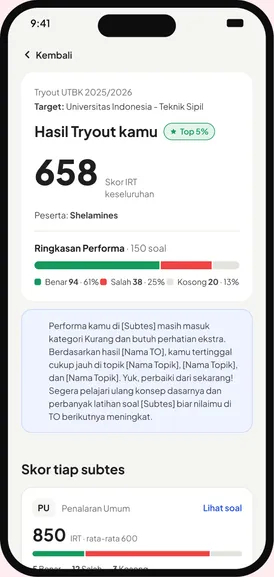
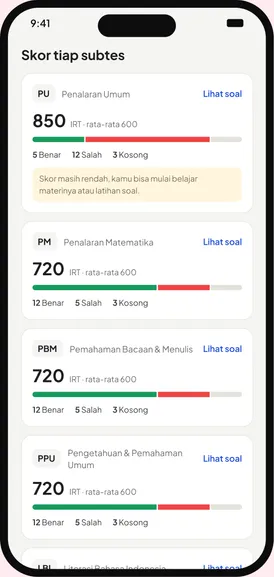
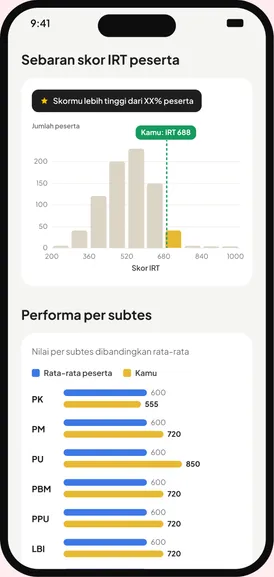
- — Report with score per subtest, the national IRT distribution and a strength radar
Result
+24%
Try Out registrations
71%
participants open their report
Try Out · Report
Know exactly what to study next.
The report breaks the IRT score into subtests, score distribution and personal notes, readable on a phone.
- IRT score
- Subtests
- Insights
02
Web · ZenPractice
Bank Soal
Problem
Students who wanted to practise one UTBK subtest had to go through full sets, and a wrong answer gave them nothing to learn from.
What I designed
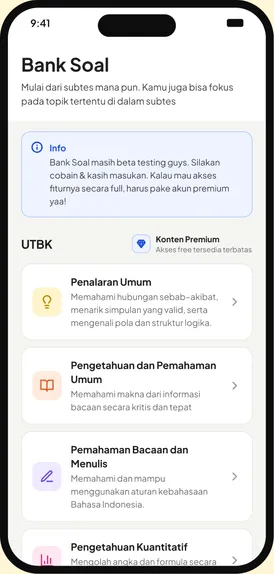
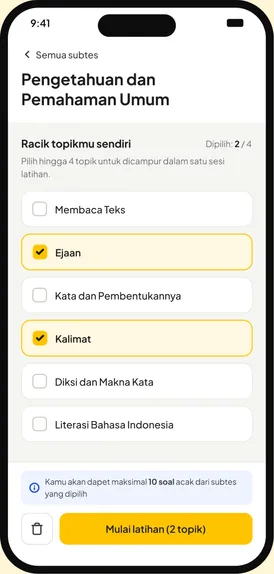
- — Pick a subtest, then mix up to 4 topics into one practice set
- — One question per page with a numbered navigator
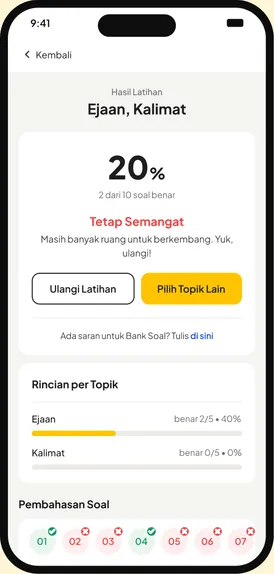
- — A result screen that points to the next step: retry or pick another topic
- — Pembahasan for every question, including video
- — Full dark mode
Result
+38%
practice sessions completed
2×
students opening pembahasan
Bank Soal · Pilih Topik
Mix your own practice.
Students pick a UTBK subtest, then mix up to four topics into one session instead of following a fixed chapter.
- Subtests
- Topic mix
- Practice result
03
Web + mobile
Bookmark
Problem
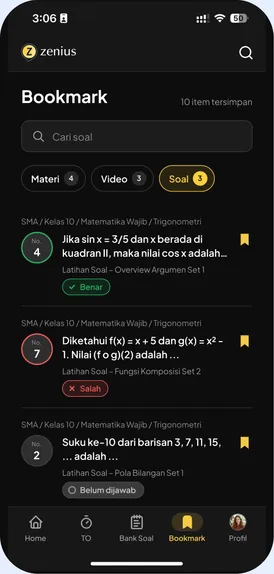
Students screenshotted materi, videos and soal to come back to later, because there was nowhere in Zenius to save them.
What I designed
- — One-tap bookmark on any materi, video or soal
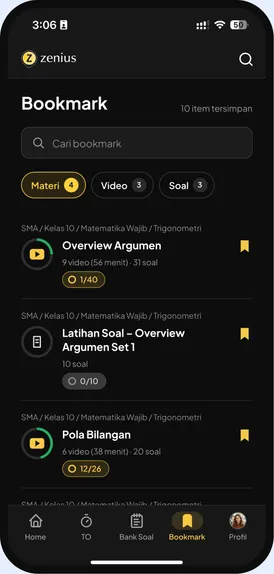
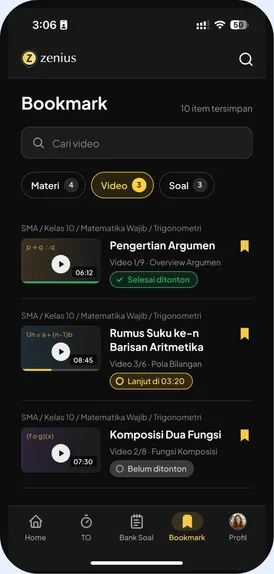
- — A Bookmark page with Materi, Video and Soal tabs, plus search
- — Bookmarks reopen in context, with progress kept
- — The same flow on web and mobile
Result
31%
of active students saved an item in month one
+12%
return visits within 7 days
Bookmark
Save it now, study it later.
Videos and questions students save land in one place, grouped so they can pick up right where they left off.
- Saved videos
- Saved questions
- Quick resume
04
Web + mobile
Homepage
Problem
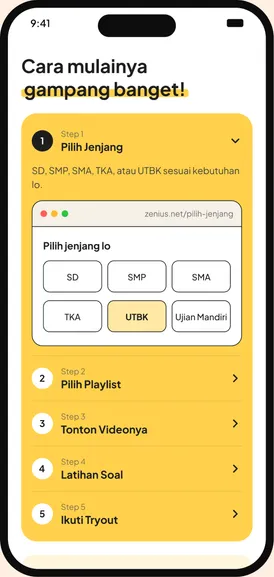
The old homepage tried to say everything at once. New visitors couldn’t tell what Zenius offers or where to start.
What I designed
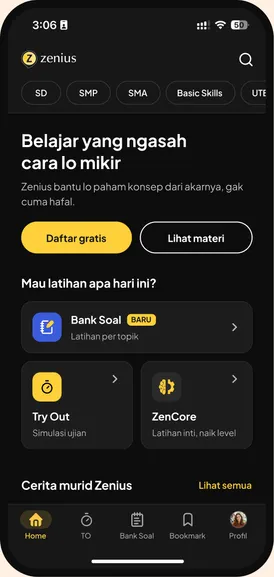
- — One clear promise, “Belajar yang ngasah cara lo mikir”, with two CTAs
- — Real student photos as proof
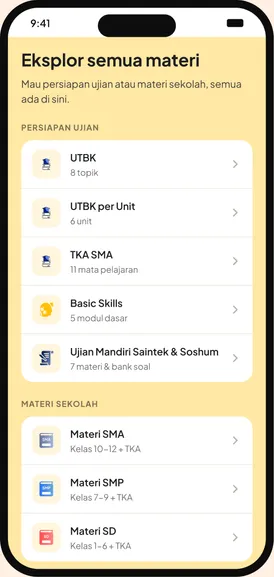
- — Every level, from SD to UTBK, one tap away
- — Plans compared side by side, then FAQ
- — New mobile home and profile, plus an accessible variant
Result
−22%
bounce rate
+17%
clicks to sign up
Homepage · Website
A front door that explains Zenius.
The new homepage walks visitors from the core promise to the content library, the learning framework and pricing.
- Hero
- Content library
- Personalised
05
LMS for Indonesian schools
Skul.id
Problem
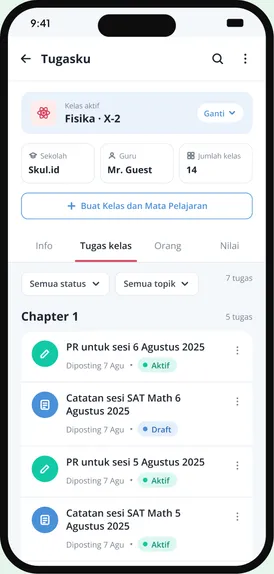
Schools using Zenius juggled separate tools to assign material and track progress, so teachers rarely came back after onboarding.
What I designed
One school space where teachers create classes, assign Zenius videos, soal and Try Outs, and follow each student's progress on a single dashboard.
Result
~15 min
to set up a class (was days)
3×
weekly active teachers
Skul.id · LMS
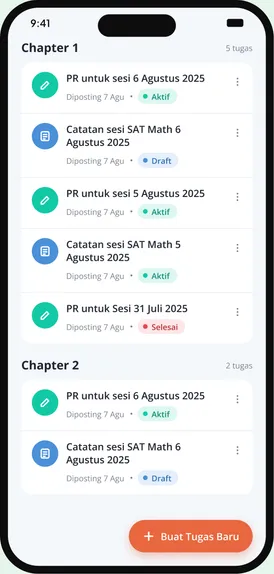
Class tasks, organised by chapter.
Teachers in Indonesian schools manage assignments per class and chapter, with clear status for every task.
- LMS
- Tasks
- Status
06
Revamp · Web + mobile
Blog
Problem
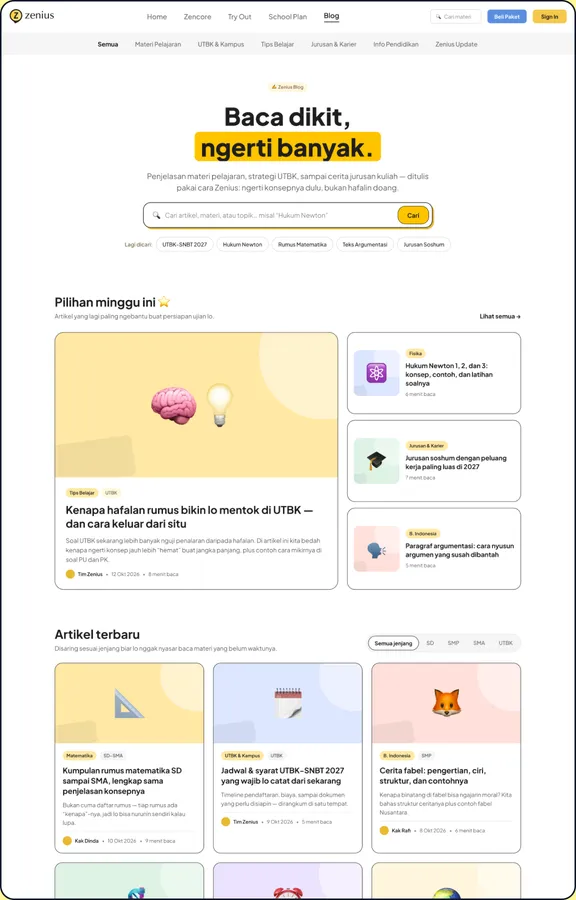
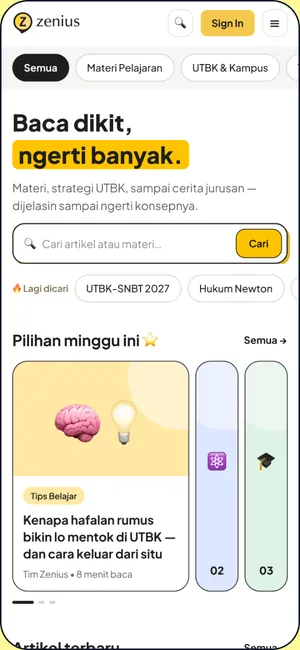
The blog still used the old UI next to the modern zenius.net. Its navbar only linked to TKA and UTBK materi even though much blog traffic is SD and SMP, there were too many categories to browse, and on mobile tall cards and big images meant very long scrolling.
What I designed
- — Navbar rebuilt: Materi (SD to Ujian Mandiri) and Beli Paket, plus a blog menu with relevant categories
- — Home structured into Featured, Persiapan Ujian, Zenius Insights, Seputar Zenius and Artikel Terbaru
- — Compact cards: thumbnail, tag, headline, writer, date, with 3–4 articles per section
- — Article page with a table of contents, up to 3 tags and smart “Artikel Terkait”
- — Smaller author photo on author pages, and numbered pagination to jump to any page
Goals
Consistent
with the modern zenius.net design
Shorter
mobile scrolling, better content discovery
Design language
One yellow, one ink, one typeface.
The revamp boils Zenius down to its brand yellow, a warm ink and a single Plus Jakarta Sans scale. Every screen in this case study is built from these Znet tokens, so app and web finally feel like one product.
Primary colors
Yellow carries the brand and every primary action; ink does the reading.
Zenius Yellow
yellow/500 · #FDCB3A
Brand, primary buttons, highlights
Ink
neutral/900 · #231F20
Text, secondary buttons, dark surfaces
Aa
Plus Jakarta Sans
Open source · Google Fonts · official Zenius website font
What I learned
Small steps beat big screens.
Breaking a long task into one clear step at a time did more for completion than any visual polish.
A shared system let me ship seven features without the product feeling stitched together again.
Every page needs an audience. Schools, parents and students each needed their own story.